Building scalable white-label Android apps with Gradle

Sean Kenkeremath
Senior Staff Software Engineer

A single Android codebase can generate an arbitrary number of app variants. A common use case for this is white-labeling (i.e., reskinning the same app for different clients or brands). Gradle provides us with a robust set of tools for handling this.
However, choosing the right approach from the beginning is extremely important. A solution may seem manageable with one or two different variants, but it can easily become an unmaintainable and expensive mess when we start adding more.
Keeping branding out of our logic
Gradle provides us with a feature called flavors to save us from a tangled web of branching logic in our codebase. A flavor represents a variation in your build, and multiple dimensions of flavors can be combined together as needed. Suppose we have a news app that we would like to white-label for multiple news stations. We could define our flavors in this way in our build.gradle file:
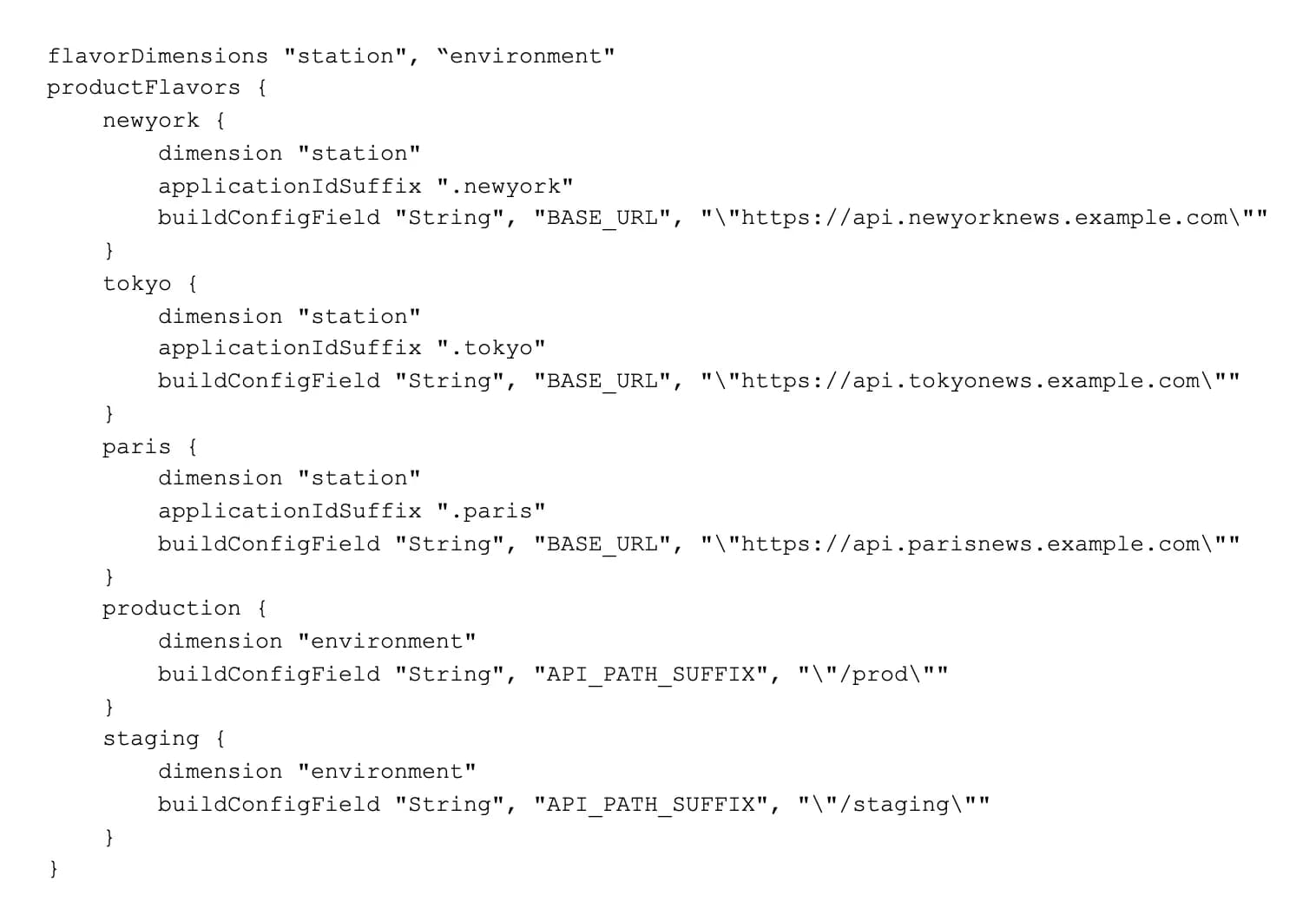
In the above example, we have defined two independent flavor dimensions. The first dimension is called “station” and will be used to define the news station for which we’re building this app. The second dimension is called “environment” and will be used to define which backend environment the app will communicate with. Next, we create the flavors themselves, specifying which dimension the flavor belongs to.
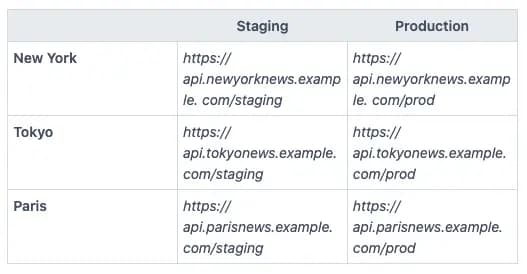
For each flavor in a given dimension, we can define the same set of build variables with different values. These variables can then be referenced in our code to perform logic. For instance, in our code, we may have a variable that combines BASE_URL and API_PATH_SUFFIX to give us the full URL for our API. In our tokyoStaging build that would evaluate to https:// api.tokyonews.example. com/staging while our newyorkProduction build would yield https:// api.newyorknews.example. com/prod.
In addition to these Gradle properties, we can override any part of our main source set by creating a parallel folder for that flavor. At compile time, any resources and source files defined in a folder for an active flavor will be merged on top of the main source set. The most common use case for this is to override resource values such as strings and images.
For instance, if I create a tokyo/res/values/strings.xml, any strings in that folder will be combined with the main/res/values/strings.xml when I compile a Tokyo build. If a collision occurs, the flavor-specific strings will override the main strings.
As a basic example, this can be used to change the app name for our different stations. If we reference a common app_name variable in our main/AndroidManifest.xml, we simply need to override that variable per station flavor in order to change the name. This can also be used for logos, colors and any other assets or values necessary for branding.
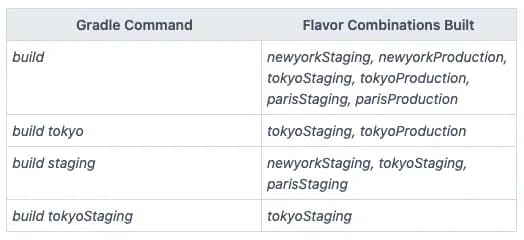
To generate a build, we choose a flavor for each dimension and use that to invoke Gradle via build {flavor combination}. If we omit a dimension from our flavor combination, Gradle will include every flavor from the missing dimension by default.
A scalable CI approach for white-label apps
We could use our single codebase to build dozens or even hundreds of stations. There is really no limit. Our approach with Gradle flavors scales nicely, but we need to make sure that our CI setup does as well.
To support a large number of white-label app variants, we need a separate job in our CI for each station. In some situations, we may want to build all stations, such as when preparing for a release, but in other situations, we may just want to build one at a time or specific flavor combinations. Most importantly, this allows us to build in parallel. If we have hundreds of stations, not having this level of control would be a huge bottleneck. Luckily, Gradle gives us very fine-grained control over which flavor combinations are built when, and we can easily invoke Gradle commands from our CI.
As we saw above, most station-specific configuration values can be hard-coded as part of the Gradle flavor definition. However, keys and other secret values must live outside the codebase. So, in addition to efficiently orchestrating builds, our CI needs to support injecting station-specific secret values to our apps at build time in a way that scales.
This repository provides an example app with multiple flavors, an Azure Pipelines configuration and step-by-step instructions on how to get it running. In our example, we have utilized build templating to reuse a single parameterized build configuration for all of our variants. For injecting our app secrets, we have used Azure Pipelines’ secret variable groups feature.
Creating a new variant would simply involve a few lines in our Azure Pipelines YAML file and defining a new variable group. Any changes we want to make to our build steps can be changed in a single place for all variants, but can also be overridden as necessary per variant. This type of flexibility and scalability is crucial when supporting a large number of app variants.