How to fix unexpected Podfile.lock diffs after pod install

Matt Hess
Senior Software Test Engineer

If you are working with other developers on a project using CocoaPods, then you may have seen the below change in your Podfile.lock when trying to install pods. It can be frustrating to see this diff when you have made no changes.
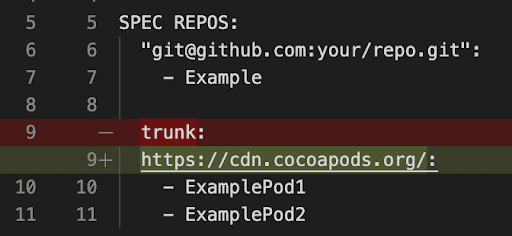
The Issue
What is happening is that your machine is downloading public pods in a different way than your colleague’s machine. This can happen due to two possible reasons. Either your CDN (content delivery network) source is named differently from your teammate’s, or you are using a different source altogether.
Example: Source Name Mismatch
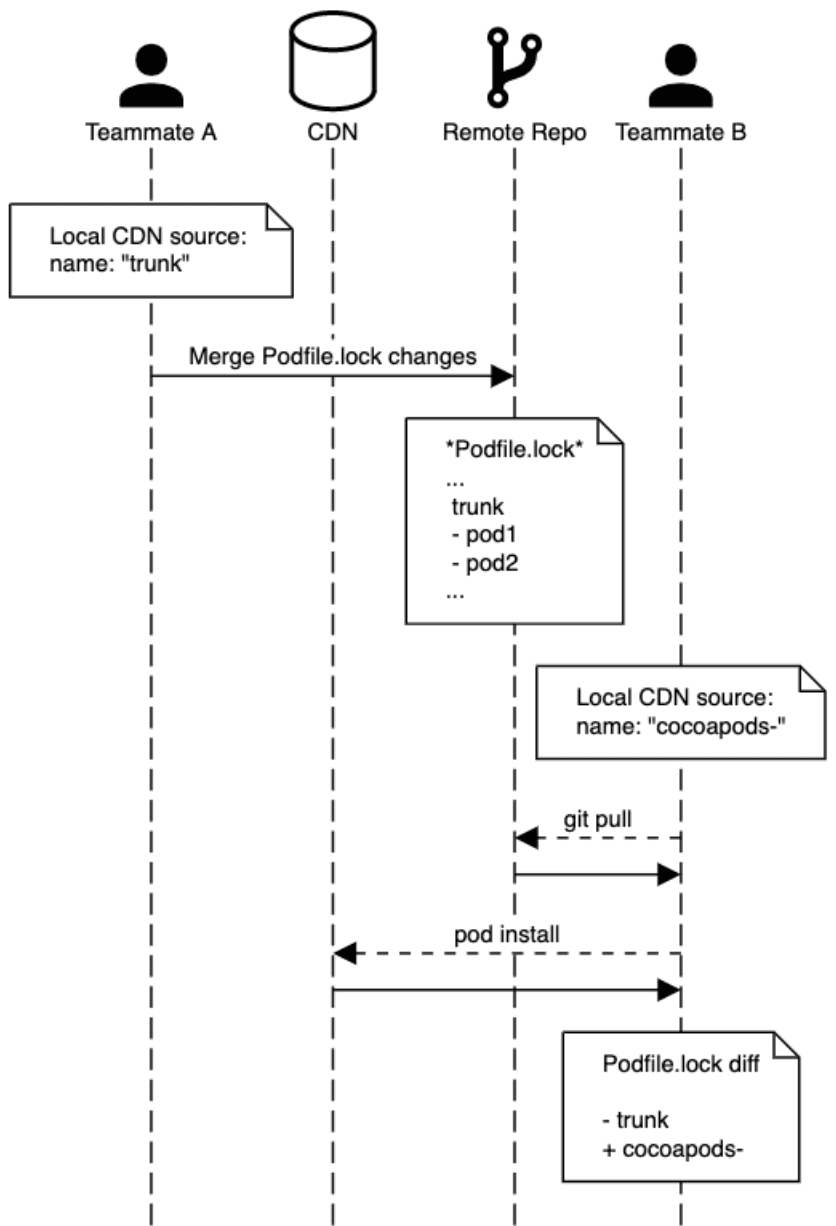
Teammate A commits new work that installs pods from the CDN source, named “trunk” on their machine. The new work is pulled down by teammate B, and they sync up their local pods. Teammate B’s machine also has the CDN source, but it is named “cocoapods-” on their machine. The diff occurs because the source names don’t match, even though the pods and source location are the same.
With Cocoapods 1.8+, the primary source for public pod downloads is the CDN (https://cdn.cocoapods.org/). Prior to 1.8, the primary source was hosted on GitHub (https://github.com/CocoaPods/Specs.git).
If you are seeing a 1-line diff whenever you run pod install, it is possible that:
- Your spec repo source is the correct CDN, but the source is named something different than your colleague’s source (i.e., “cocoapods-” vs. “trunk”)
- You are pulling public pods from the legacy public repo: https://github.com/CocoaPods/Specs.git (likely named “master”)
Solution
In the terminal, run:
If you see “master” (mapped to the legacy source) or “cocoapods-” (mapped to the CDN) in your repo list, you can remove them using:
The next time you run pod install, you should not see any diff on Podfile.lock.
Note: Each team member should check their environment and update accordingly. Otherwise, you might still see source/naming diffs. Double-check any changes to Podfile.lock during code reviews to catch this before it is merged.
Example
I know from experience that it can be frustrating to deal with this. I hope this has been helpful to you and your team!
More Information
For more information on Podfile.lock, visit the Cocoapod Guide for Podfile.lock. Sequence Diagram made using https://sequencediagram.org/.
Diff image via Visual Studio Code - https://code.visualstudio.com/