AI agents beyond the terminal: What agentic AI looks like inside enterprise apps
Sr. Director, Engineering, TELUS Digital

Senior Staff, Product Designer, TELUS Digital

Senior Product Designer, TELUS Digital
Key takeaways
- Most enterprise AI still works like a chatbot, answering in a paragraph and leaving the user to act on that answer alone.
- The five stages of agentic depth range from static products with no AI to products that learn and reshape themselves around each user over time.
- Real progress starts at stage two of agentic depth, when an agent's answer becomes a working part of the interface instead of a paragraph to interpret.
- Seven recurring UX patterns, from context injection to unprompted suggestions, separate agentic products that feel trustworthy from ones that feel unstable.
- Companies moving agents deeper into their products are betting that the interface, not the underlying model, becomes their long-term competitive advantage.
If your product has an AI feature, there’s a good chance it looks like a chat window. Maybe it’s embedded in the corner of a dashboard or floating over your mobile app. Users type a question, read a paragraph and then close the chat to take action themselves. The AI and the app barely talk to each other.
Our design team examined what comes after the chat window from a UX perspective. We define how anticipatory, GenUI-powered interfaces actually feel to users and what it takes to earn their trust. Here, we’ll map the depth at which agents can integrate into your product and the seven patterns that serve as the foundation for anticipatory interfaces.
The foundations of agentic AI use
Developer tools led the first wave of agentic AI for a straightforward reason. The terminal was typically the developer's native environment. Coding agents didn't have to invent a new interface because they fit nicely inside one that the user already lived in.
Tests and compiler access gave the agent an automatic feedback loop: the code runs and compiles, the system knows if it fails. That infrastructure enabled agents to be effective for the developer experience, but coding tools are only a narrow slice of where work actually happens.
Knowledge workers, consumers and enterprise workflows don't operate in a terminal. They operate in mobile apps, web platforms and dashboards. So far, the pattern AI has taken there is far more narrow, primarily limited to generative AI.
The gap between knowing and doing
A bolted-on generative AI chatbot has a fundamental constraint: it answers in language, and the user has to translate that answer into action. Ask a banking app's AI assistant about your credit utilization, and you get a paragraph. You read it, close the chat, navigate to a marketplace and start the hunt for a card that matches your needs.
The AI knew the answer, but the app didn't react.
Our research on the next generation of AI interfaces found that users want AI that knows them like a second brain and can take actions on their behalf, as long as user control is maintained. A chat window cannot support that, but an AI agent with the right tools and context (or a team of orchestrated agents, each with its own specialization) can. It can react to what the user is looking at, respond in the app's own vocabulary (components, navigation, actions) and update what's on screen without requiring the user to mediate.
That makes AI agents capable collaborators with access to the whole experience.
The five stages of agentic depth
We’re starting to see five distinct areas for how an AI agent can integrate into digital experiences, and most enterprise deployments today sit near the shallow end of agentic integration. Stage zero is where almost every app currently is, and the real value of AI comes with greater depth.
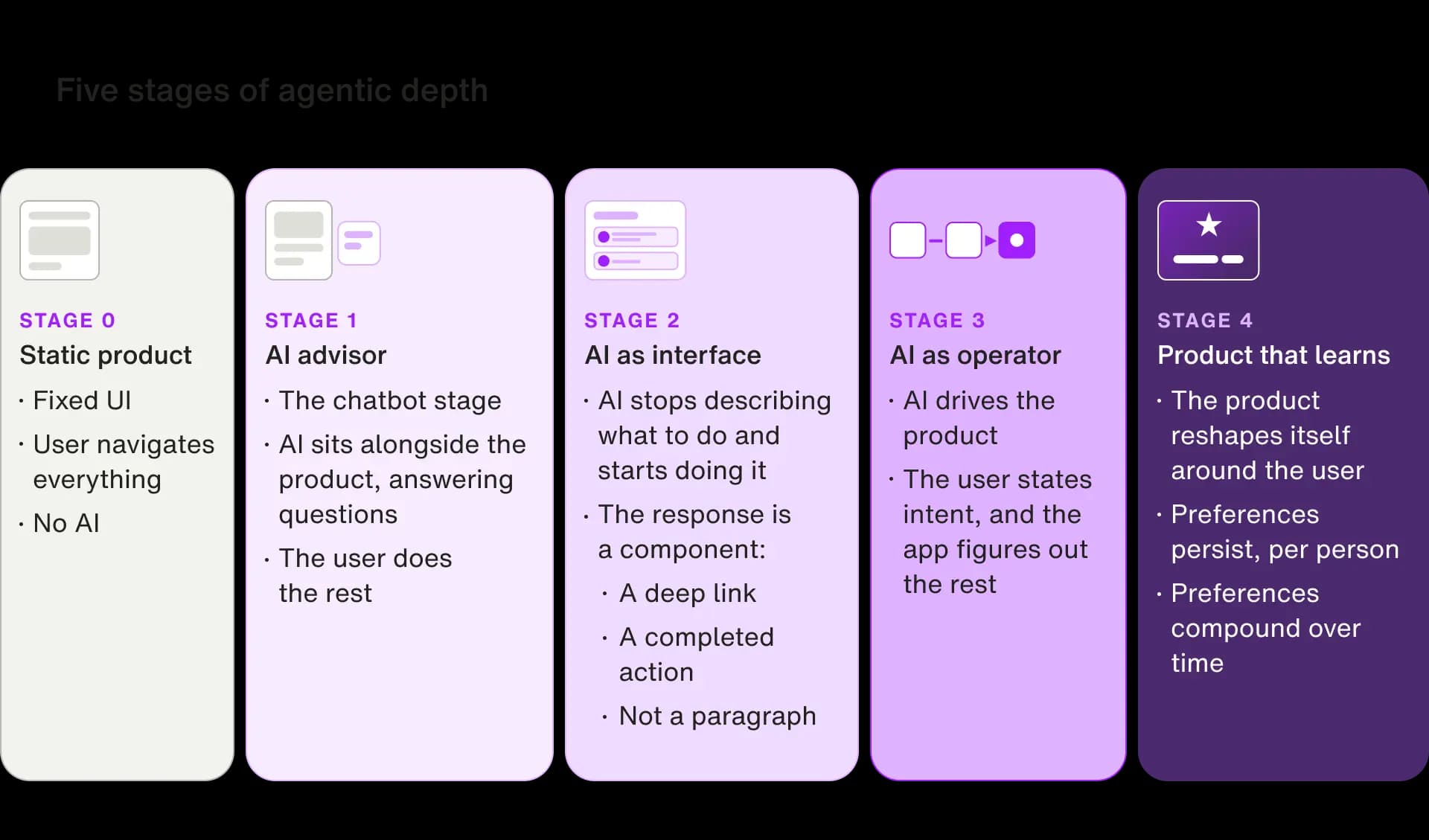
The first meaningful advancement is stage two, when the answer becomes the interface. That's the line where AI stops describing what to do and starts doing it. Everything before stage two leaves the user doing the translation work, and everything past it starts removing that work. Generative AI doesn't disappear at this line; its job changes. Instead of generating a paragraph that describes an action, it generates the component that performs one. That shift, from generative text to generative interface, is called GenUI, and it's the rendering layer every pattern below runs on.
What stage two can look like depends on the product:
- In a travel app, an itinerary assembles itself.
- In a shopping app, a cart swaps an item to a better deal.
- In a banking app, a fee is caught and disputed before it posts.
Getting past stage one is as much a UX challenge as an engineering one. A generated interface can feel magical or unstable and uncanny, and the difference comes down to seven recurring UX patterns.
Seven patterns: The foundation for anticipatory interfaces
Stages two through four run on seven patterns. Each step up adds context and requires less prompting from the team. By building context injection and decision cards effectively in stage two, a team can establish the infrastructure that stage three's autonomy and stage four's learning loop run on. No rewrite required. Skip the patterns and depth stalls at stage one, no matter how capable the underlying model.
What follows is that foundation, pattern by pattern.
Pattern 1: The context-aware answer
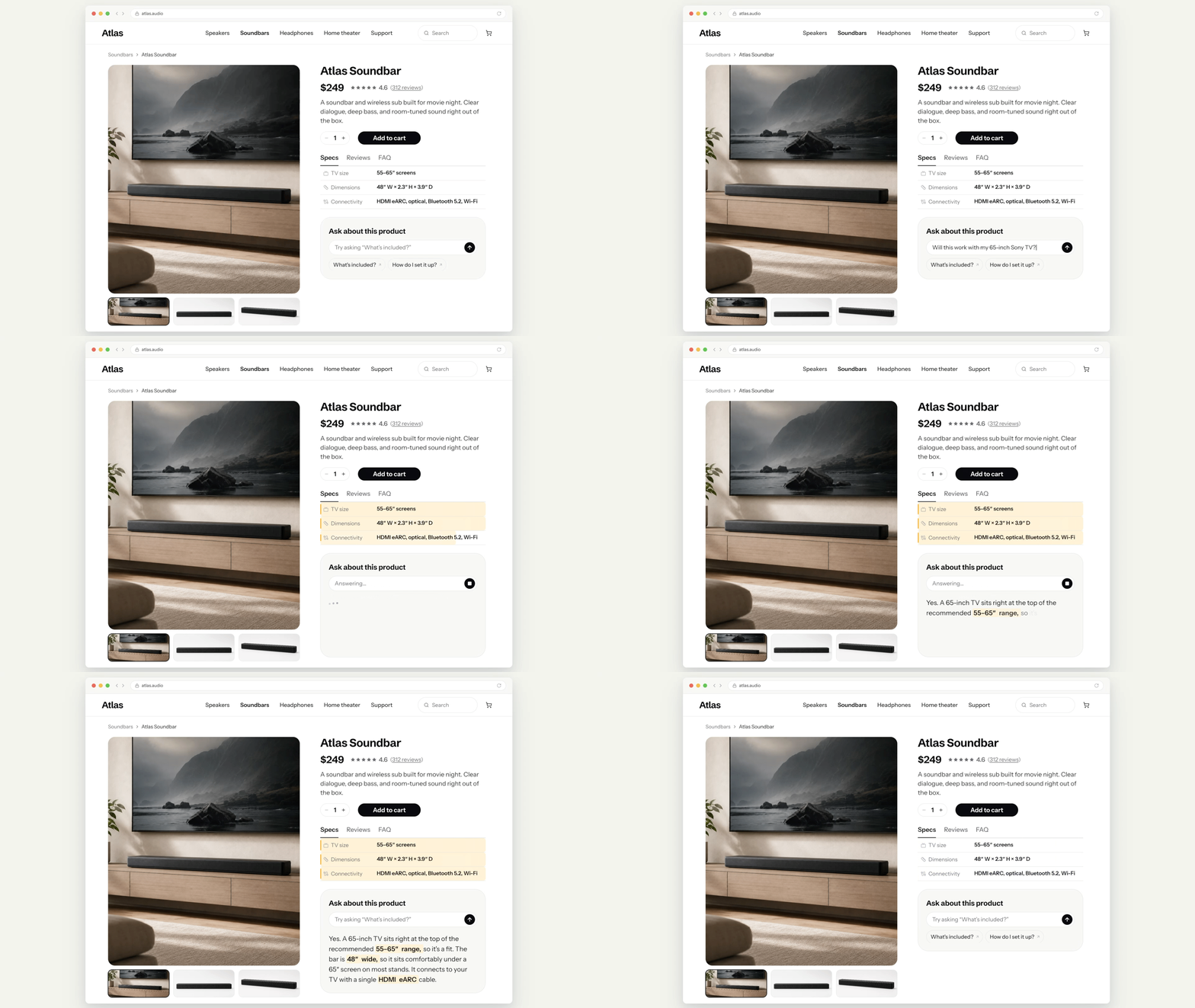
The fastest way to make an assistant smart is to give it more context. If a user asks a travel app about a page they’re currently viewing ("Is this excursion good for a slow trip with older parents?") and they get a generic answer, that’s because the agent can’t read their screen.
The fix is context injection. Every screen builds a small state object, and, for a travel experience, it could be the destination, its highlights, prices, even the hotel names visible on the page. This gets injected into the relevant query as additional context.
The pattern transfers anywhere. On a retail product page, the question "Will this work with my TV?" should be answered using the specs and reviews being displayed to the user.
For a transaction detail in a credit card app, the question "Why is this higher than usual?" should source key information like the merchant and billing cycle to provide a helpful answer. In each case, the AI agent already has the context to answer the question the user actually asked. And the same approach can be extended to inject personalization context unique to each user.
Pattern 2: Questions as components
Agents often need information from the user before they can act: a budget, a quantity, a size, a preference.
The chatbot approach is to ask in the thread and parse whatever comes back. The generative approach is to give the agent a tool that asks the question through an interface instead. The agent authors the question, chooses the format (yes/no, multiple choice), provides options and renders an animated card with tappable buttons.
In a travel app, that might mean the agent checks your luxury preferences before booking you into a $700-a-night hotel. In a footwear shopping app, the agent might ask what surface you play soccer on before finding soccer cleats, since that points to entirely different shoes.
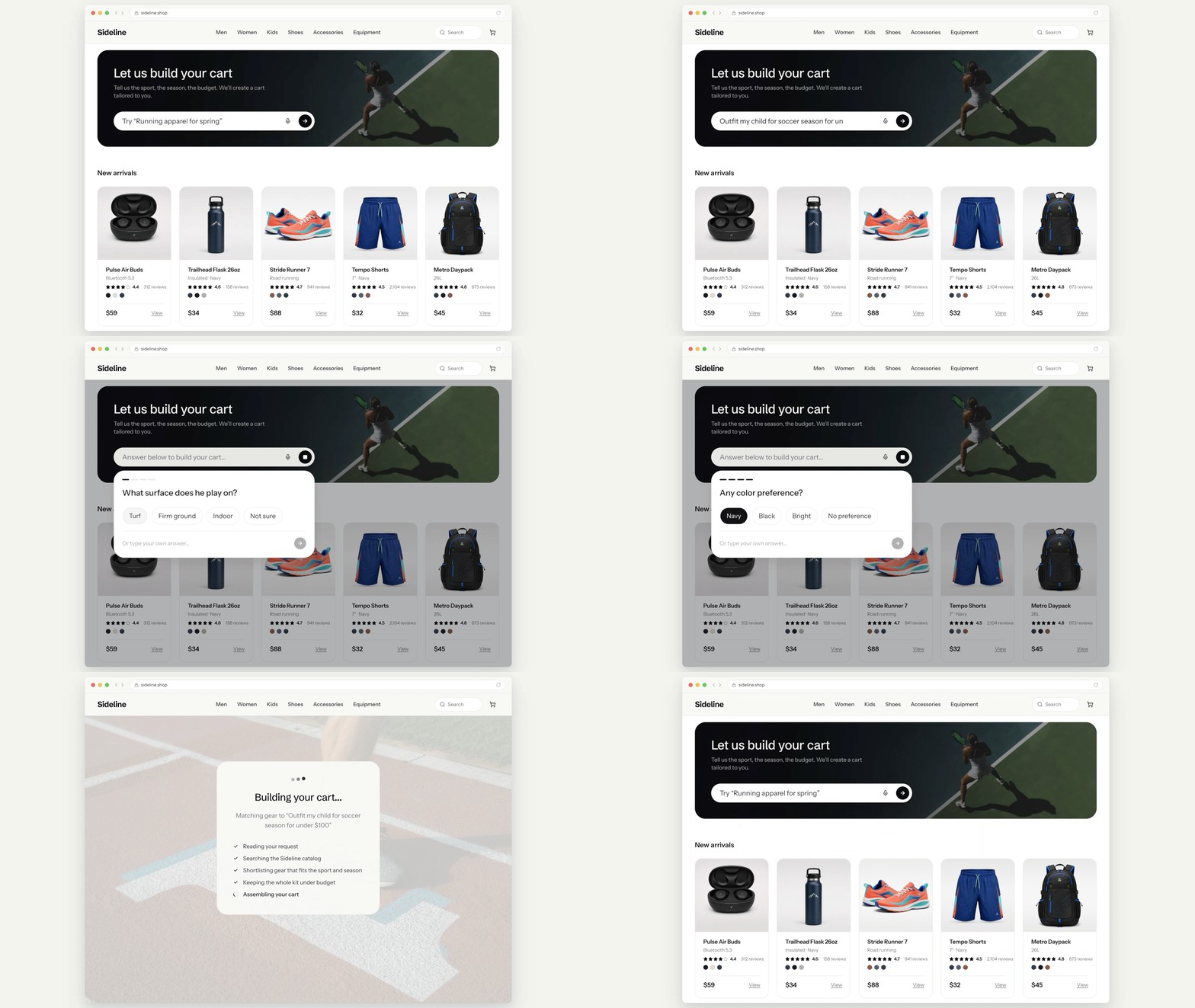
If the experience requires the user to answer preferences before proceeding, it’s important to bake that into the tools the agent has available to ensure the question tool is the only one available. A prompt can only ask the agent to ask first. Removing every other tool makes asking the only thing it can do. That single rule eliminates a whole class of agent-skipped-the-question bugs that no amount of prompt language (e.g., “You MUST ask before proceeding.”) will fix.
Pattern 3: Decision cards
When presenting a user with a trade-off, an agent should render it as a decision, not a description.
In a travel example, if a plan comes in over budget, a specialized budget agent can propose two or three options derived from the travel request: Downgrade the recommended hotel with the savings shown, drop a named experience or switch the flight to economy. Each option is a card. The user taps one, the affected part of the plan reworks itself and the total updates.
A paragraph that says, "You could save $700 with a cheaper hotel" still leaves the user to go do that. A tappable card that makes the swap is the product doing the work, not describing it.
The same pattern works everywhere users face bounded choices. For instance, a banking app might catch a projected overdraft and offer the user cards, in addition to an alert: "Move the autopay to Jul 22, frees $344 | Skip this week's meal-kit, frees $62 | Move $150 from savings, frees $150."
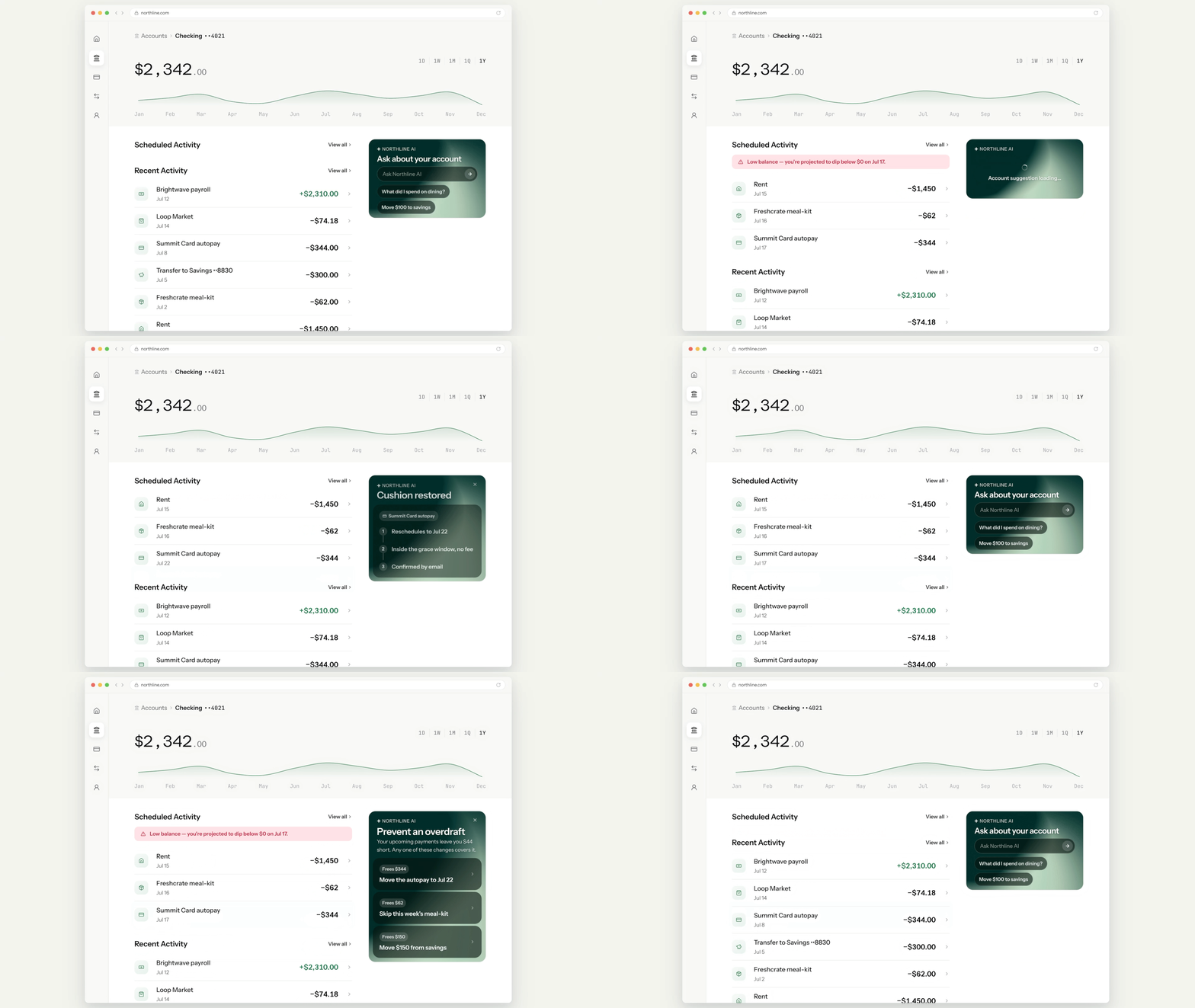
The design test is simple to apply: Can the options be enumerated, and can the consequences be computed? If yes to both, a lengthy, chatbot-style explanation is the wrong output format.
Pattern 4: The visible crew
More complex user requests need more than one agent, each with a narrow job and its own focused prompt. Something like, "Plan three days in Kyoto," fans out to multiple agents, specializing in flights, stays, experiences and budget.
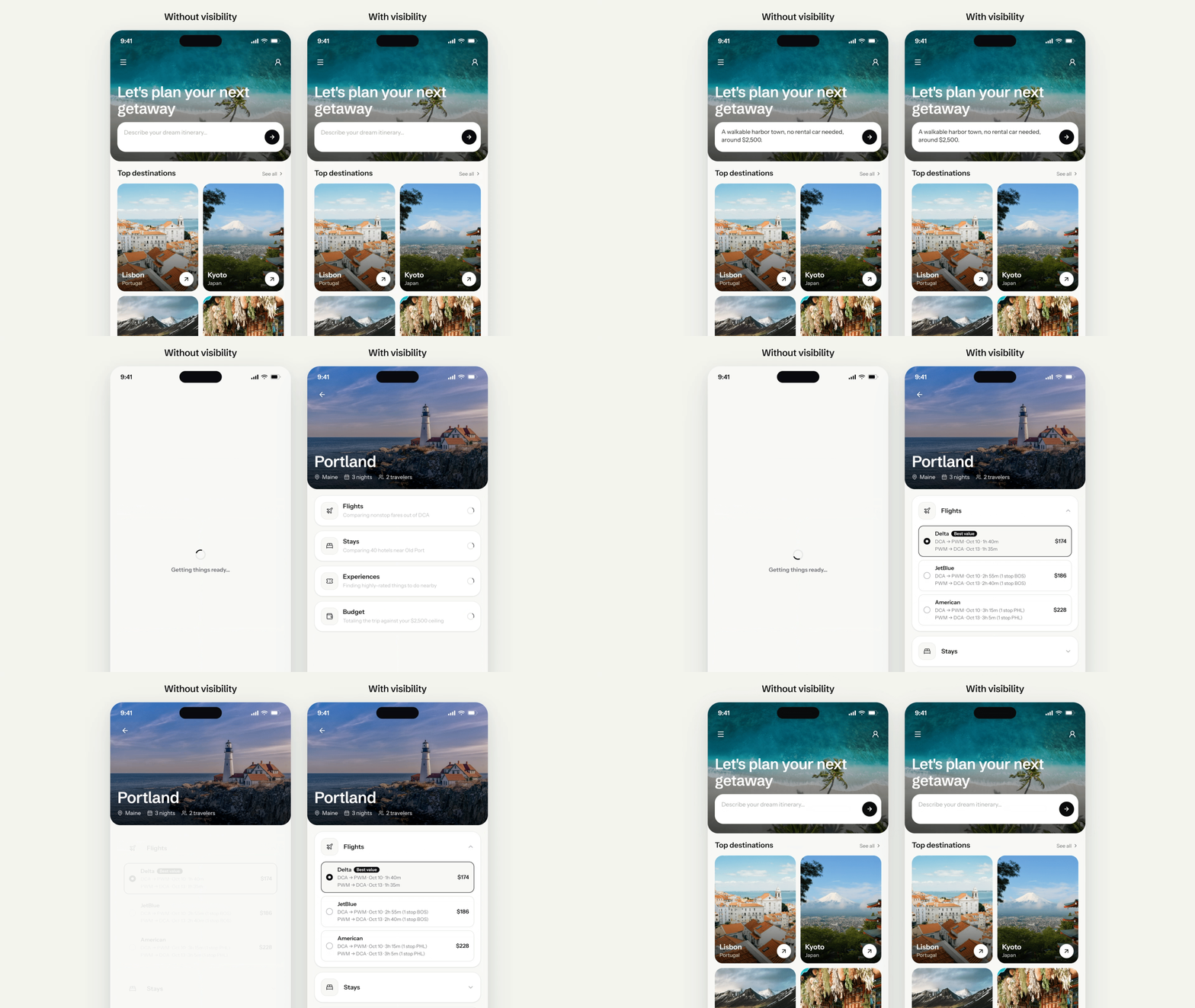
The objective of the UX pattern here is to show the work. Each specialist agent has a lane on the screen that displays its results, one after another. Watching lanes finish is what makes a 30-second orchestrated agent run feel like progress. A spinner of the same length feels broken and doesn’t enhance user trust.
This agent workflow fits any complex user request:
- "Outfit my daughter for soccer season under $150" requires a product finder, a price-and-rewards hunter and a budget reconciler.
- "Get me ready to buy a car this fall" requires a down-payment modeler, a pre-approval checker and a cash-flow analyst.
Decompose the intent, stream the progress and reconcile at the end.
Pattern 5: Surgical updates
Generated UI earns trust by being stable. The failure mode of generative interfaces is rebuilding the world on every request: If changing one detail regenerates the whole screen, nothing the user did feels persistent, and the product stops feeling like theirs. Stability is part of the delight.
When a shopping cart user says, "Change the cleats to a cheaper pair," in a cart where cleats are just one item in a larger purchase, only that line reworks to drop the subtotal. The jersey, shin guards and socks don't move, resize or reflow. When they say, "Remove the socks," only that line disappears, and the rest of the cart holds exactly where it was.
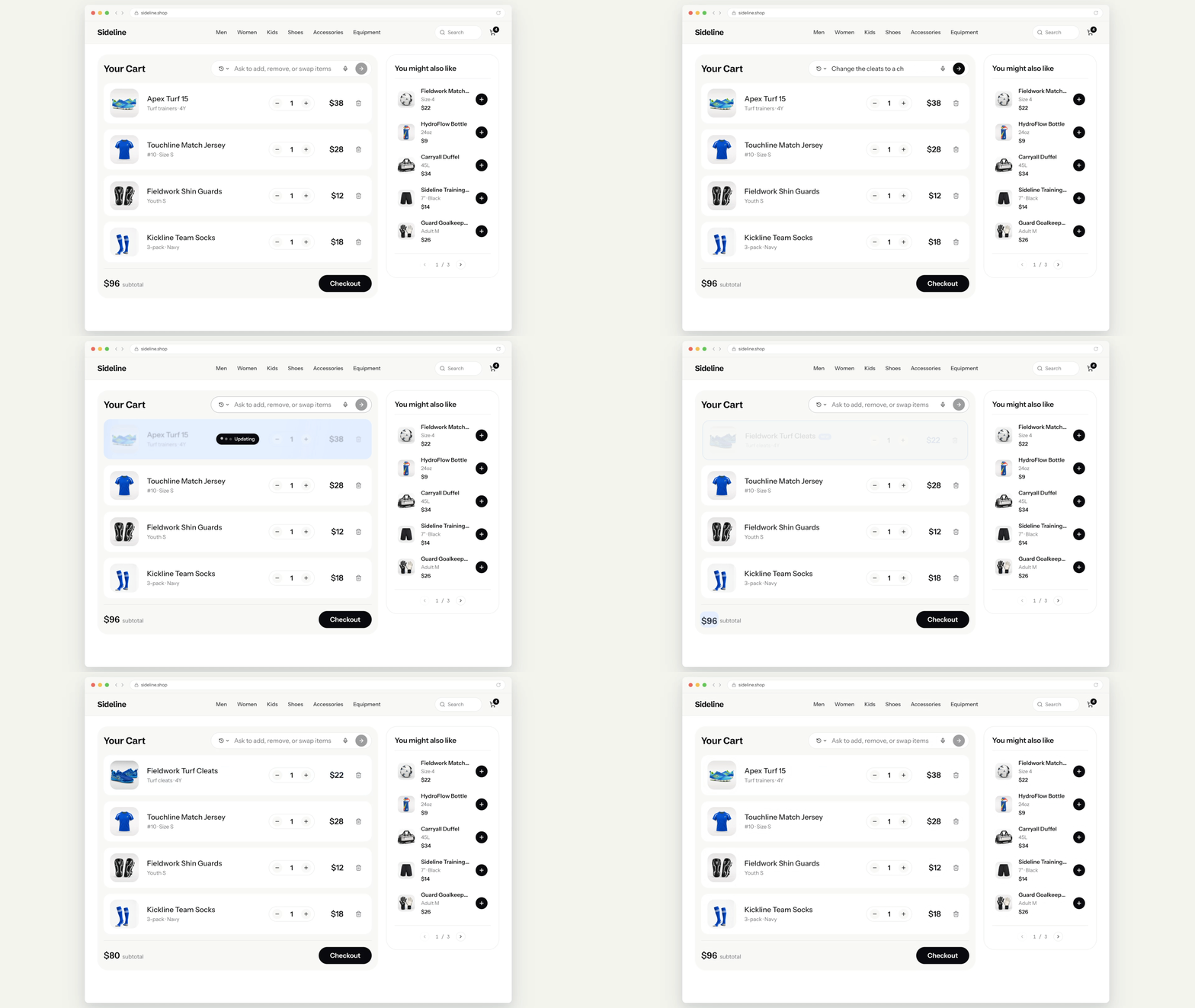
A coordinator agent routes every modification by asking one blunt question: Does this change affect what the other specialists found? If a travel app user with a finished trip says, "Shift everything a week later," nothing about their itinerary should visibly change except the dates. When they say, "Find a cheaper hotel," only the stays and budget lanes should rework, and the user should see those parts reset and complete again, while everything else holds still.
Pattern 6: Voice in, components out
For complex user requests, such as, "Hey, I'm hoping to buy a car this fall. Am I ready or should I wait for a better rate?" voice should be prioritized as the input modality. In our user research on the future of AI interfaces, users organically mentioned voice commands as a preference far more often than text, signaling where their excitement truly lies.
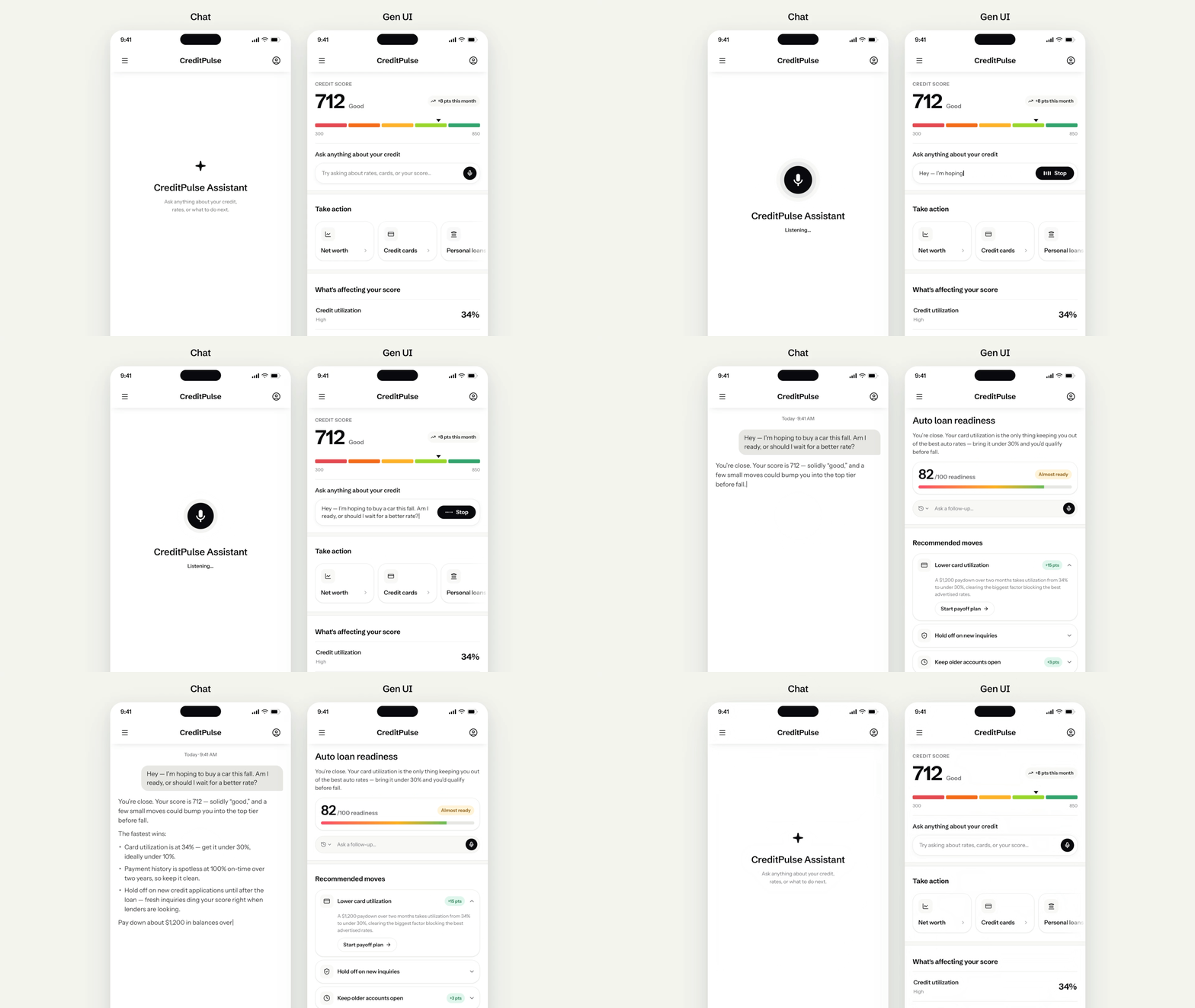
An agentic app should default to listening, because the highest-value requests tend to be the longest ones, and typing those out is where users hit the most friction. Voice output, though, makes decisions harder: three tappable options beat hearing three read aloud every time. So intent arrives by voice, and decisions come back as cards.
A blank prompt is intimidating in any domain, so the agent should generate a few starters from the current screen's context, such as:
- "Is spring the best time to visit?" on a travel destination page
- "Is this a good price?" on a retail product page
This ensures that the user’s first interaction is a tap, not a composition exercise.
Pattern 7: The unprompted card
Everything in the previous patterns is reactive: The user is the first to take action. The deepest pattern inverts the trigger. The system observes a state and surfaces a solution before the user asks:
- Shopping app example: "Your saved jacket dropped to $89, and your size is almost out of stock. Order it?"
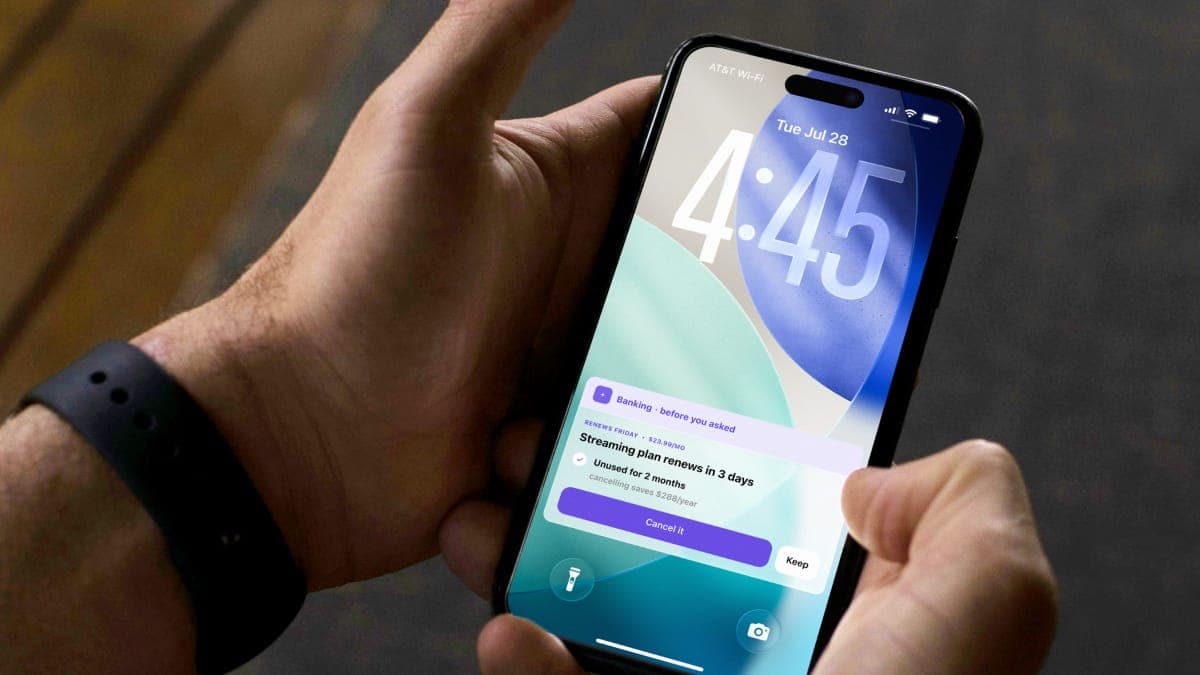
- Banking app example: “Your streaming subscription renewal is in three days. Cancel it?”
- Travel app example: “Your anniversary is coming up. Book a long weekend?”

The mechanics are the same as the patterns we’ve already described: shared state, decision surfaces, constrained tools. What changes here is the trigger, making products more anticipatory than merely responsive.
The anticipatory evolution
The most meaningful examples start with the system observing a state: a health metric trending in the wrong direction, a document waiting for approval, an itinerary that needs rebooking. The agent surfaces the right action for the user, based on context, before the user thinks to ask. A system built on an individual model that compounds over time is hard for a competitor to replicate.
The companies moving agents deeper into their products right now are making a bet that the interface is the competitive moat, not the model. Models are increasingly a commodity. What isn’t a commodity is the behavioral data, the learned preferences and the compound trust that builds when a product gets more useful the longer someone uses it. Staying at stage zero of agentic depth is a choice to let that compound interest accrue somewhere else. If you’re evaluating how to move your product past chatbot-level AI, reach out today.
Adam Shea
Sr. Director, Engineering, TELUS Digital
Adam Shea brings over 15 years of engineering and delivery leadership experience to TELUS Digital, where he has spent more than a decade helping shape how the organization builds and delivers technology. His background spans mobile and cloud platforms, and in recent years he has become a driving voice in how artificial intelligence integrates into modern software products, developing frameworks that help teams think clearly about AI's role across the product lifecycle, from user-facing interactions to underlying architecture.
Adam Shea brings over 15 years of engineering and delivery leadership experience to TELUS Digital, where he has spent more than a decade helping shape how the organization builds and delivers technology. His background spans mobile and cloud platforms, and in recent years he has become a driving voice in how artificial intelligence integrates into modern software products, developing frameworks that help teams think clearly about AI's role across the product lifecycle, from user-facing interactions to underlying architecture.
Steve Gordon
Senior Staff, Product Designer, TELUS Digital
Steve Gordon is a senior staff product designer at TELUS Digital with over 20 years of design experience across interactive, web and product work for clients in finance, telecom and beyond. His recent work explores agentic AI and conversational interfaces, focusing on how people interact with intelligent systems beyond the chat window.
Steve Gordon is a senior staff product designer at TELUS Digital with over 20 years of design experience across interactive, web and product work for clients in finance, telecom and beyond. His recent work explores agentic AI and conversational interfaces, focusing on how people interact with intelligent systems beyond the chat window.
Nicole Cacchiotti
Senior Product Designer, TELUS Digital
Nicole Cacchiotti is a senior product designer at TELUS Digital with a background spanning start-ups and enterprise across highly regulated industries. She sits at the intersection of strategy and human-centered design, and enjoys shaping systems that improve day-to-day lives. Currently, she is focused on designing AI-native experiences that earn user trust.
Nicole Cacchiotti is a senior product designer at TELUS Digital with a background spanning start-ups and enterprise across highly regulated industries. She sits at the intersection of strategy and human-centered design, and enjoys shaping systems that improve day-to-day lives. Currently, she is focused on designing AI-native experiences that earn user trust.